MCP Server allows to:
- Searching offers in natural language: destination, dates, who travels (adults and children's ages), budget and filters
- Browsing hotels: description by topic, photos, rooms with photos, distances, guest rating
- Comparing variants of an offer: other dates, departure airports, meal plans and room types
- Fetching real guest reviews
- Checking the live price, availability and payment schedule of an offer
- Handing over to your booking wizard with a pre-filled link (the booking and the payment never happen inside the AI conversation)
- Showing offers as interactive cards in Claude
Offers, language and currency come from the brand's own catalog, and booking always finishes on the brand's site.
Sample conversation
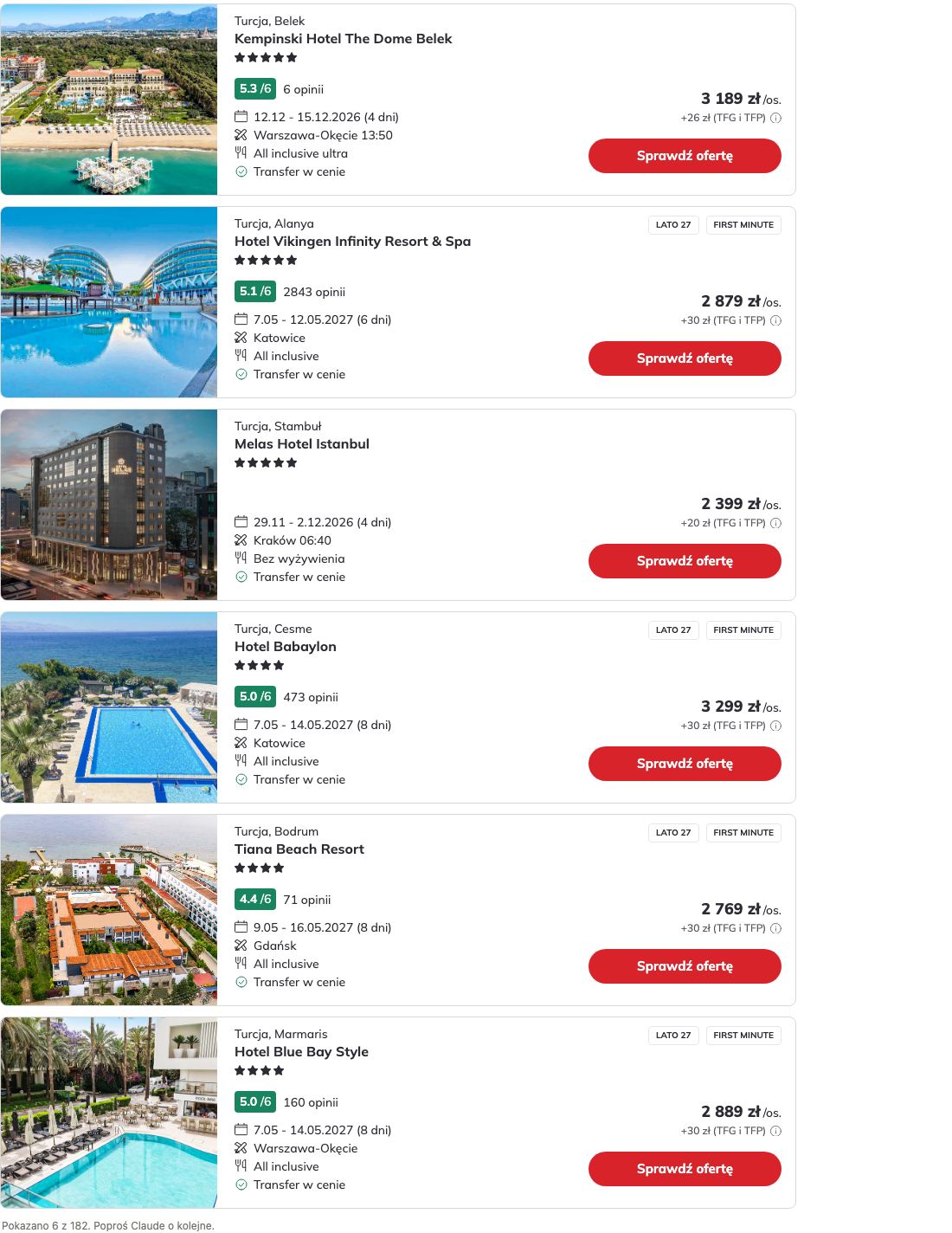
An all-inclusive week in Turkey in December, 2 adults and a 3-year-old, flying from Warsaw.
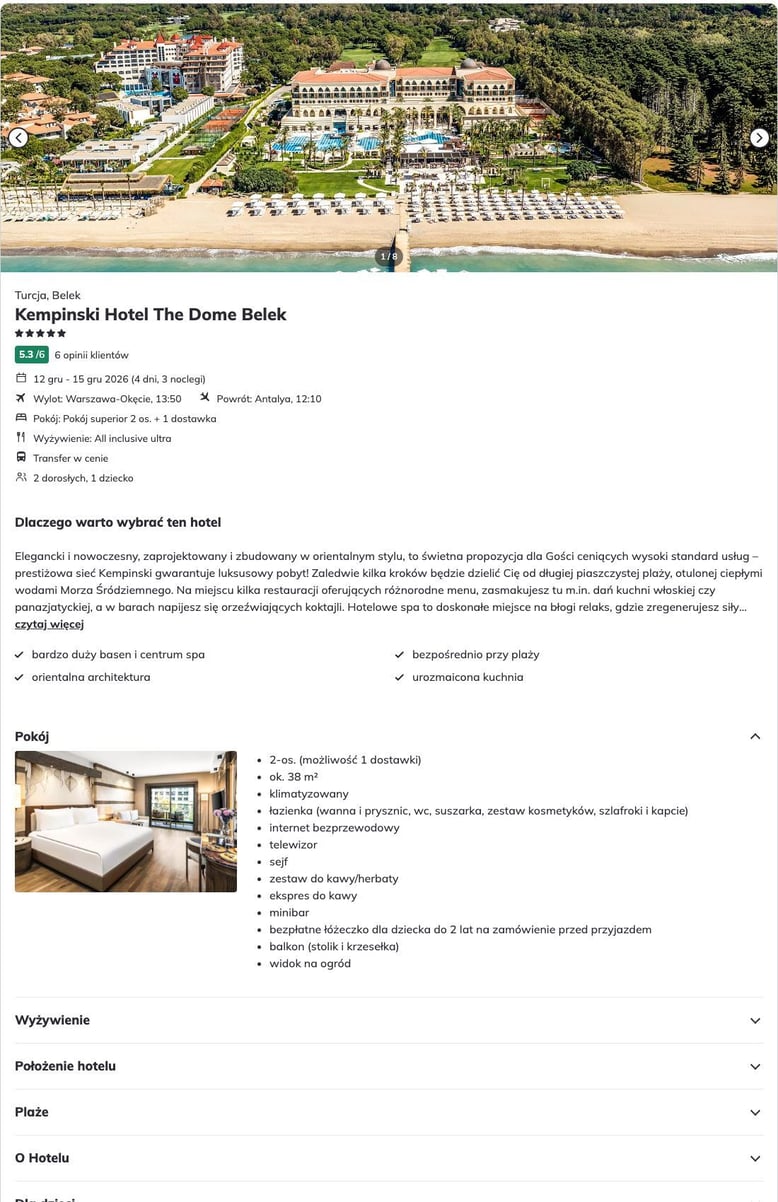
Tell me more about the first hotel.
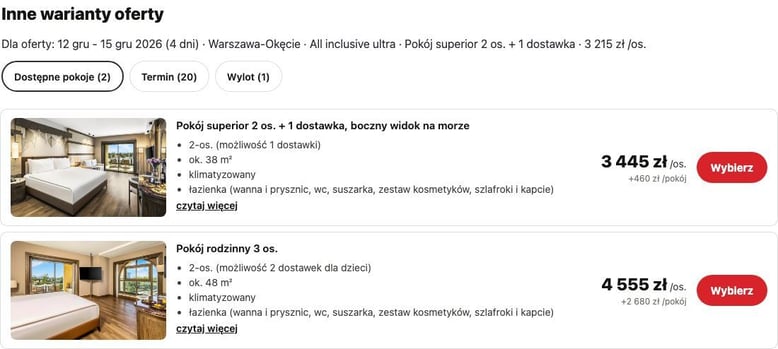
What other rooms are there?
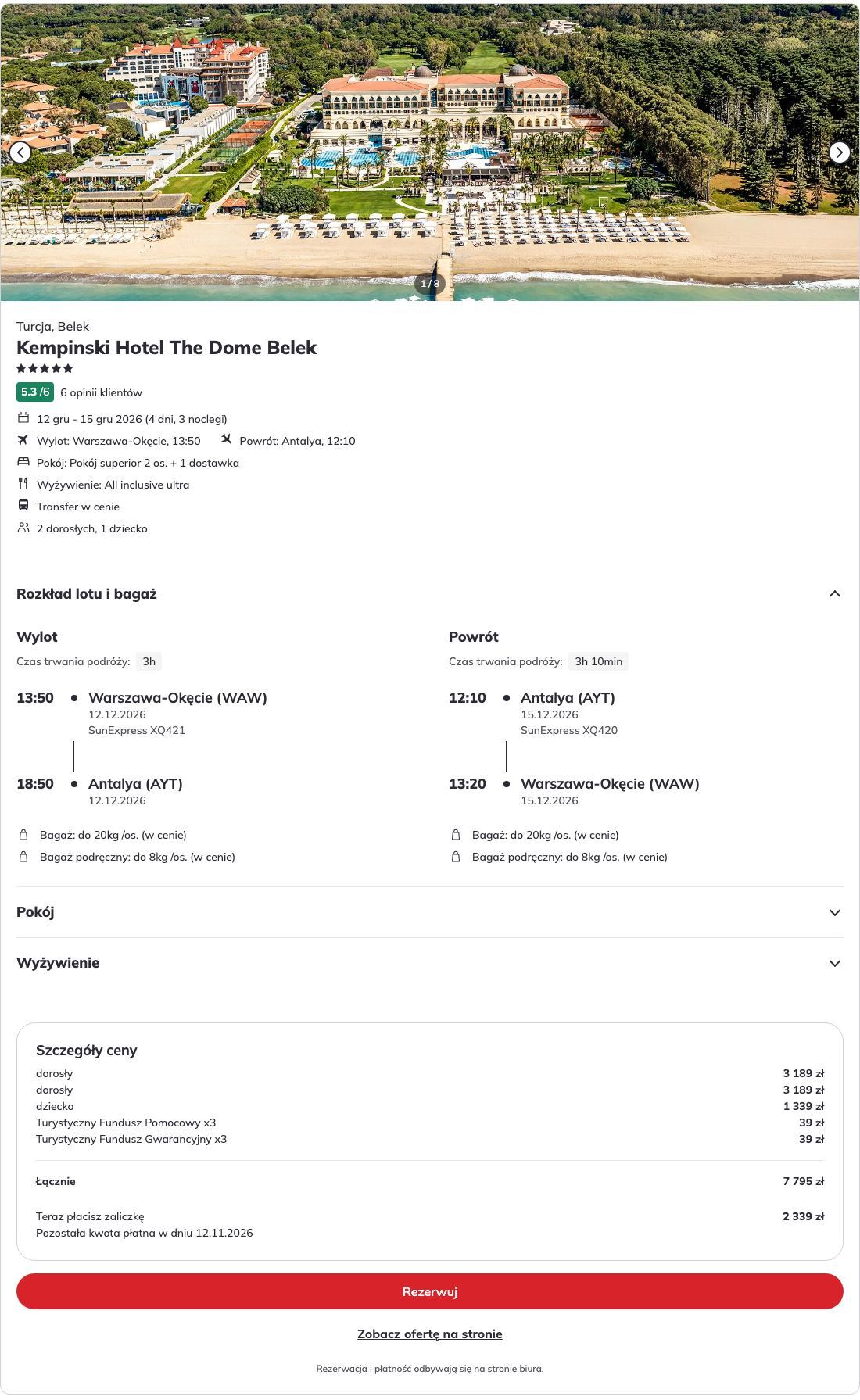
Check that offer and give me the booking link.
How it works
The assistant calls the MCP Server, which reads the Offers API (Data API) and returns the offers. All tools are read-only. To book, the traveler presses a button and finishes on the brand's site.
Brands
Each brand has its own connector with its own catalog, language, currency, booking site, support and privacy policy.
| Brand | Site | Support | Privacy policy |
|---|---|---|---|
| ITAKA (Poland) | itaka.pl | itsupport@itaka.pl | Personal data |
Connectors of other brands are listed here when they launch.
Limitations
- It never completes a booking and never takes a payment: that always ends with a button to finish on the brand's site.
- It has no user accounts and keeps no conversation history between sessions.
- Each connector covers the offers of one brand, in the languages and currencies that brand offers.
Where it works
The connector works the same way in Claude on the web (claude.ai), in Claude Desktop and in the Claude mobile apps: offers are shown as cards with photos, rating, price, flights and a booking button.
Setup
About a minute, nothing to install.
- In Claude, open Settings → Connectors (or the connectors directory) and search for your travel brand, for example ITAKA.
- Choose Add or Connect.
- Start a new conversation and describe the holiday you want.
Authentication
None. No sign-in, no account, no password, no token and nothing to approve. The connector only reads the brand's public offer catalog. You sign in to the brand only if you choose to, on the brand's site, when you open the booking wizard.
Example questions
- An all-inclusive week in the sun in November, 2 adults and a 3-year-old, flying from my nearest airport. Claude searches the catalog and shows a few offers as cards with the price per person and in total.
- Tell me more about the first hotel, and show me what guests say about it. A hotel card with photos, rooms and the parameters of that offer, then real guest reviews.
- Is the same hotel cheaper a week later? And what other rooms are there? Alternative dates and room types of the same offer, each with the price difference.
- Check that exact offer and give me the booking link. A booking card: flights, room, total price, the deposit and when the rest is due, and a button to the brand's booking wizard.
- Where can I fly cheaply in October? Destinations with the cheapest current offer each.
Tools
Ten tools, all read-only (readOnlyHint). Claude decides which to use and in what order.
| Tool | What it does | Main parameters |
|---|---|---|
ping |
A connection check: answers pong. |
none |
get_hints |
The values the search filters accept: board types, trip types, transport, facilities, departure airports, popular destinations. Read once per conversation. | none |
autocomplete_search |
Resolves free text (a destination, a hotel or a trip name, typos tolerated) into the IDs used by search_offers. |
text |
search_offers |
The main search. Returns offers with price (with mandatory fees), hotel, dates, flights, guest rating; for a party with children the price of every traveler. | adults, children_birth_dates, destination_regions, departure_codes, departure_date_from/to, price, stars, rating, board, transport, facilities, nights, take, skip, order |
suggest_destinations |
Destinations for a traveler who has none yet, with the cheapest current offer each. | adults, dates, sort_by |
get_offer_details |
Details of 1 to 4 hotels shown as a card. With the rate_id of an offer the card also shows that offer's dates, flights, room, board and price. |
supplier_object_ids, rate_id, adults, children_birth_dates |
search_hotel_variants |
Other dates, departure airports, meal plans and room types of an offer, each with its price, and photos and description of the rooms. | rate_id or supplier_object_id, adults, children_birth_dates |
check_availability |
Live price and availability of one offer: payment schedule, refundability, the lowest price of the last 30 days (EU Omnibus). | rate_id, adults, children_birth_dates |
get_hotel_reviews |
Real guest review texts, filterable by travel type or keyword. | supplier_object_id, companionship, text, take |
create_booking_url |
Checks the offer live and shows a booking card with a button into the brand's booking wizard and, when the offer qualifies, a second button for a preliminary booking with no payment. | rate_id, adults, children_birth_dates |
All tools also take optional language and currency, which follow the brand's configuration.
Data and privacy
The connector sees only what Claude sends to its tools; it never sees your conversation.
| Data | Why it is sent |
|---|---|
| Destination, dates, number of travelers, budget and filters | To search offers |
| The birth date of each child | Prices and eligibility depend on the exact age. This is personal data about a minor; it is forwarded to the brand's offer data service and appears in the booking link you open |
| Offer and hotel identifiers | To show an offer, check its live price and prepare the booking card |
- Who receives it: the brand's offer data service (Resabee). Hotel photos on the cards load directly to your device from the offer catalog's image server (
s.content4travel.com), which sees your IP address and browser like any website's images do, and nothing from the conversation. The brand's site is opened only when you press a button. - What is kept: no accounts, no conversation history, no payment data. For speed, recent search and hotel answers are cached from minutes to a day, keyed by the search parameters. A short link to an offer is kept for three days.
- What we do not do: no name, email, phone or payment details pass through the connector. We do not read your conversation, your files or your memory.
Each brand's privacy policy is linked in the table of brands above.
Good to know
- The price quoted is the price with the mandatory tourist funds, per person and for the whole party, as in the booking wizard.
- Offers without a hotel (flight only) have no hotel details or photos.
Support
Each brand's support address is in the table of brands above (ITAKA: itsupport@itaka.pl). Problems with a booking are handled by the brand's customer service.
Access
The MCP Server is available as the connector of each brand in the Claude directory. No API key and no sign-in are needed: add the connector in Claude and ask about your trip.
Add to Claude